

General
In this post, I would like to show you what are my steps to deliver you a ready-made guide on software, so you don’t have to undergo the same process.
Obtaining software
The very first phase of my deployment guide is of course getting the software. I try to find an offline installer version of each software whenever possible, so it’s completely driven by Intune. Additionally, this comes handy if you use a strict firewall or proxy rules that forbid most of the sources where software installations try to get its content from.
Silent software installation
After I obtain the software, I need to find its silent installation arguments. This is my order of determining them:
- Searching for them in the documentation
- Running the software with the /? argument to ask for all capabilities
- Trial and error (there are multiple silent switch argument, including /S, /s, /silent, /verysilent, /sAll)
If there are additional arguments, I include the most used ones. These are optional and I recommend you checking those if they’re matching your expectations and company policies.
Detection
Once the software is installed, it’s time to search for suitable traces that I could use for my detection rules. I always prioritize version comparison rules over existence rules and registry rules over file rules.
Pro tip: Try to avoid these mistakes:
- Registry detection by GUID in the HKLM:\SOFTWARE\Microsoft\Windows\Uninstall\ – Almost all software developers do change GUIDs with each version so once the software auto-updates, you will start to see many installation errors at best. In the worst case, the software will get downgraded and upgraded in a never-ending loop.
- File or key existence – use as the last resort or in specific scenarios. This method will confirm the software existence, but you have no version control which makes it impossible for you to update it reliably.
- Mind the 64-bit vs. 32-bit software keys and registry entries.
Here is my order of suitable detection methods:
- Registry (HKLM:\SOFTWARE(\WOW6432Node)\<Software name>) – Value version comparison
- Registry (HKLM:\SOFTWARE(\WOW6432Node)\Microsoft\Windows\CurrentVersion\Uninstall\<Non-GUID software keys>) – Value version comparison
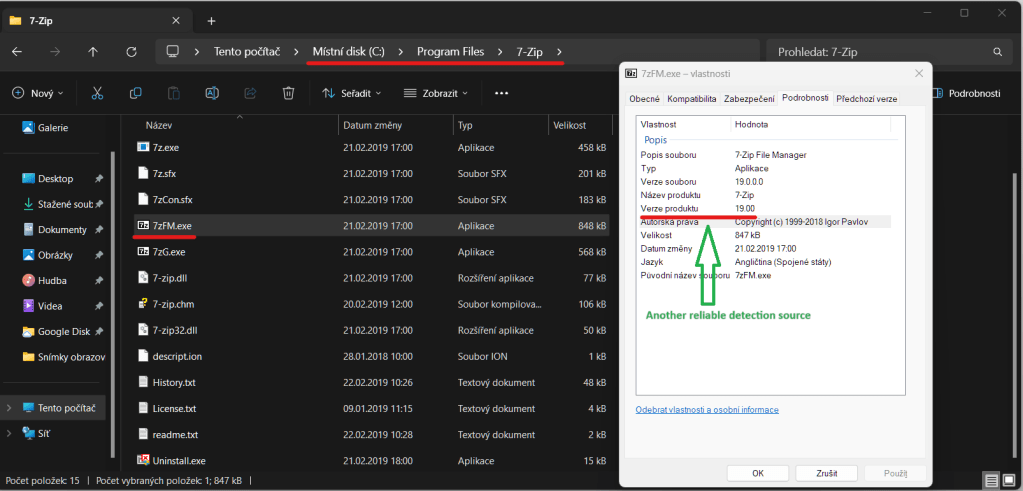
- File (C:\Program Files(Program Files (x86))\<Software Name>\<Executable.exe>) – String (version)
- Registry (HKLM:\SOFTWARE(\WOW6432Node)\<Software name>) – Key existence
- File (C:\Program Files(Program Files (x86))\<Software Name>\<Executable.exe>) – Executable existence


Uninstallation
When I collect all the required info, I can uninstall the software and move on to the next one.
What is your methodology in software deployment? Let me know in the comments below 🙂
 Intune SW deployment
Leave a comment